Can You Stop Relatives Screenshotting Shared Photo Albums?
You want relatives to enjoy the photos without keeping or reposting copies. Before choosing an app, separate three controls: blocking a screen capture, allowing a download, and notifying an admin. They do different jobs, and none can stop someone pointing another camera at the screen.
Three controls that are easy to confuse
What each setting does
| Control | What it is for | What it does not establish |
|---|---|---|
| Screenshot blocking | Restricts screen capture in a supported app or protected view. | That every device, browser or capture method is covered. |
| Download permission | Controls whether a member can save a file through the service. | That screenshots are blocked unless the service explicitly links the settings. |
| Screenshot notification | Alerts selected people when a capture event is detected. | That the capture was prevented or every attempt will be detected. |
Encryption answers a different question: who can read the stored photo. Once an authorised relative can see it on a screen, copying becomes a separate issue. Start with the control you actually need rather than treating an “encrypted” or “private” label as a promise about screenshots.
Does FamilyAlbum prevent screenshots?
FamilyAlbum’s current guidance says that when download permission is turned off, its app blocks screenshots and screen recordings for those photos. That is more specific than saying the service always allows screenshots or always prevents them. Read the current FamilyAlbum guidance and check the permission for the intended family member.
Use a harmless test photo with a willing relative. Confirm that saving is restricted and check what happens when they try a screenshot on their own device. Do not assume that behaviour observed in the mobile app is identical in a browser. If the result differs from the documentation, ask FamilyAlbum support about that exact app version and device.
How to review the controls in Clann
- Open Group admin. Review the settings for the family group that contains the photos. Do not assume another group uses the same permissions.
- Review Photo downloads. Choose which approved members may save photos and videos to their devices. A download permission is separate from whether a screenshot event is detected.
- Review Screenshot notifications. Decide whether to enable the admin notification flow and review the available member controls. A notification is an alert, not proof that a copy never existed.
- Test on the intended devices. Use a non-sensitive photo and confirm the behaviour in the mobile app. Treat browser viewing as a separate route to check rather than assuming it has the same capture protection.
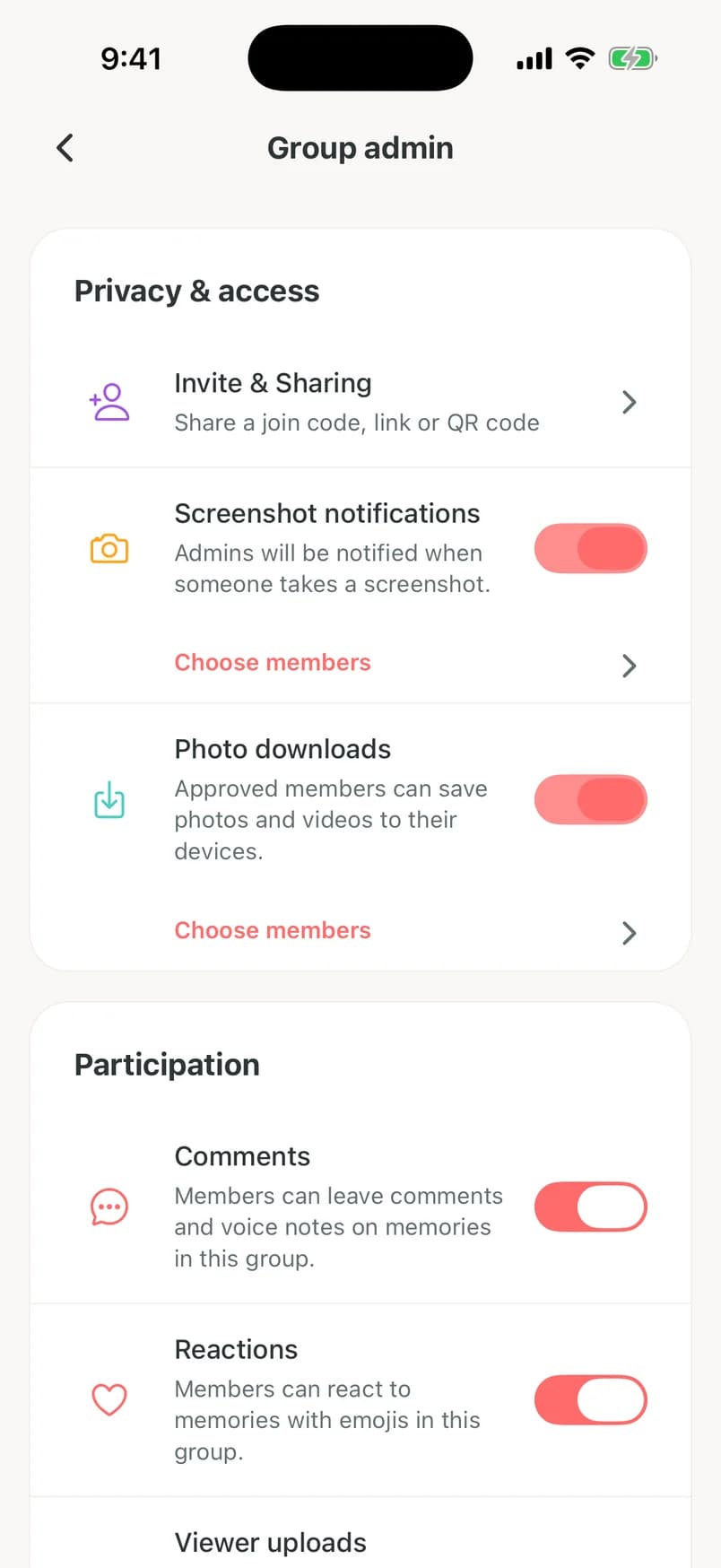
Clann provides screenshot protection in its mobile app and supports optional screenshot notifications. These controls depend on the supported device and app behaviour. An admin-approved browser lets a relative view photos; approval should not be read as a guarantee against browser screenshots. For the wider encryption model, read Clann’s security reference.
Private sharing funded by your family
Clann is paid because family subscriptions fund the service. We do not sell user data, show ads or use family photos and videos to train AI. One subscription covers the family members you invite.
Download the mobile app to review the plan. In the US, the annual plan is $59.99 after a 7-day free trial; the monthly plan is $11.99. Prices vary by country and store.
WhatsApp view-once photos are a different case
For a sensitive one-off photo, WhatsApp documents screenshot blocking for view-once media. You must choose view once when sending; it is not a blanket setting for all photos in a family chat. The recipient cannot keep reopening that message, so this is different from a lasting shared album.
To send a view-once photo, select the photo in the chat, choose the circled 1 control, and confirm that view-once mode is active before sending. See WhatsApp’s current instructions. WhatsApp also warns that another camera can record the screen. Use it with people you trust rather than treating it as a guarantee against copying.
If a relative has already saved or reposted a photo
Changing a download setting does not reach back into someone’s camera roll and erase a copy they already made. Ask the relative to remove the copy or post, review their access, and agree on what may be shared going forward. If you remove a member, also check any outstanding invitations or viewing links that the service lets you manage.
A direct request often makes the boundary clearer: “Please enjoy the photos in our family album, but don’t screenshot, download or post them elsewhere without asking us.” For a longer conversation, use our scripts for asking family not to post baby photos.
What to check before sharing the next photo
- The audience: Invite the people you intend and review members when circumstances change.
- The exact route: Test the app, browser or message type your relative will use.
- The available controls: Check downloads, capture restrictions and alerts separately.
- The family agreement: Make permission to view different from permission to repost.
Use technical controls to reduce easy copying, and choose the audience carefully. If a photo would put someone at risk outside the intended group, a setting cannot substitute for deciding whether to share it at all.
Questions about screenshots and shared albums
No. Its current guidance says disabling download permission also blocks screenshots and screen recordings for those photos in the app. Check the relevant member settings and supported device behaviour.
No. Detection, notification and prevention are separate behaviours. Check the app’s documentation and test the exact route rather than treating an alert as a guarantee.
Removing access does not erase a file already saved on another person’s device. Ask for those copies or posts to be removed and review future access.
Set the boundaries before sharing